
Managing entry at a large Navratri or Garba event is not only about scanning QR tickets. Organizers need to plan multiple gates, ticket-category routing, QR scanning lanes, staff responsibilities, guest support, invalid-ticket handling and crowd movement before the first guest arrives.
A simple entry workflow can be:
Guest Arrives → Finds Correct Gate → QR Ticket Scan → Ticket Verification → Check-In → Entry
For larger events, this workflow can be managed through an event technology platform such as Wowsly, which supports digital tickets, QR-based entry, attendee management and event check-in.
Key Takeaways
- Do not send every guest through one entry gate.
- Separate gates according to ticket type, access level or crowd volume.
- Keep QR scanning and guest-support functions separate where possible.
- Test QR tickets and scanning devices before event day.
- Give every gate team a clearly defined responsibility.
- Keep a separate help desk for invalid, missing or difficult-to-scan tickets.
- Prepare an offline or backup entry process for connectivity problems.
- Monitor entry activity so staff can be moved to busy gates when required.
- Clear signage can prevent guests from joining the wrong queue.
- The goal is not simply faster scanning; it is a controlled guest journey from arrival to entry.
Why Event-Day Entry Becomes Difficult During Navratri
Navratri and Garba events can bring a large number of guests to the venue around the same time.
The problem is not always the number of tickets sold. It is how many guests arrive at the same time and how quickly each entry point can process them.
For example, an event may have:
- General passes
- Couple passes
- Group passes
- VIP passes
- Complimentary passes
- Sponsor or special-access passes
- On-spot registrations
If everyone is directed to one queue, even a well-organized ticketing system can create congestion.
Wowsly's recent Garba event checklist already recommends separate entry gates, QR testing, scanner testing and staff preparation. This article goes one step further by focusing specifically on how to design and manage the event-day entry flow.
How Should You Plan Multiple Entry Gates for a Garba Event?
The right gate structure depends on your venue, expected crowd and ticket categories.
A simple setup could look like this:
| Gate | Recommended Use | Team |
| Gate 1 | General Entry | QR scanning team |
| Gate 2 | General Entry | QR scanning team |
| Gate 3 | Couple / Group Entry | QR + verification team |
| Gate 4 | VIP / Premium | VIP entry team |
| Gate 5 | Guest / Sponsor | Guest management team |
| Help Desk | Ticket Issues | Support team |
You do not necessarily need a separate physical gate for every category.
If your VIP or sponsor audience is small, one dedicated lane may be enough.
The important point is to avoid mixing every type of guest into the same queue without a plan.
Use Ticket Categories to Control Entry Flow
Ticket categories can help organizers distribute guests across the venue.
For example:
General Ticket → General Gate
VIP Ticket → VIP Gate
Couple Ticket → Couple/Group Gate
Sponsor Pass → Guest/Sponsor Gate
The ticket type should be easy for the entry team to identify.
If your digital ticket includes the ticket category along with the QR code, staff can verify both the ticket and the access level during entry.
Wowsly's Navratri event technology supports different ticket categories, digital QR tickets and QR-based check-in as part of the event workflow.
How Does QR Check-In Work at a Navratri Event?
A basic QR entry process is simple:
Step 1 — Guest Receives the Digital Ticket
After booking, the guest receives a digital ticket containing the QR code.
The ticket can be kept on the guest's smartphone.
Step 2 — Guest Reaches the Correct Gate
Clear signage should tell guests where to go.
For example:
GENERAL ENTRY →
VIP ENTRY →
COUPLE & GROUP ENTRY →
TICKET HELP →
Step 3 — Staff Scan the QR Code
The QR code is scanned at the entry point.
Step 4 — Ticket Is Verified
The system checks the ticket and its entry status.
Step 5 — Guest Enters
Once the ticket is successfully verified, the guest can proceed inside.
This creates a straightforward:
Book → Receive QR → Arrive → Scan → Verify → Enter
workflow. Wowsly already uses this type of digital ticket and QR check-in workflow for Navratri and other event formats.
How Can Organizers Reduce Long Queues at Garba Entry Gates?
The first step is to identify where queues are likely to form.
Common bottlenecks include:
- One gate receiving too many guests
- Too few scanning devices
- Guests entering the wrong queue
- Manual ticket verification
- VIP and general guests sharing the same lane
- Guests searching for their QR ticket at the gate
- Invalid or duplicate tickets being handled in the main queue
- Staff not knowing how to handle exceptions
A better setup separates normal entry from problem resolution.
Recommended flow:
Normal QR Ticket → Scan → Verify → Enter
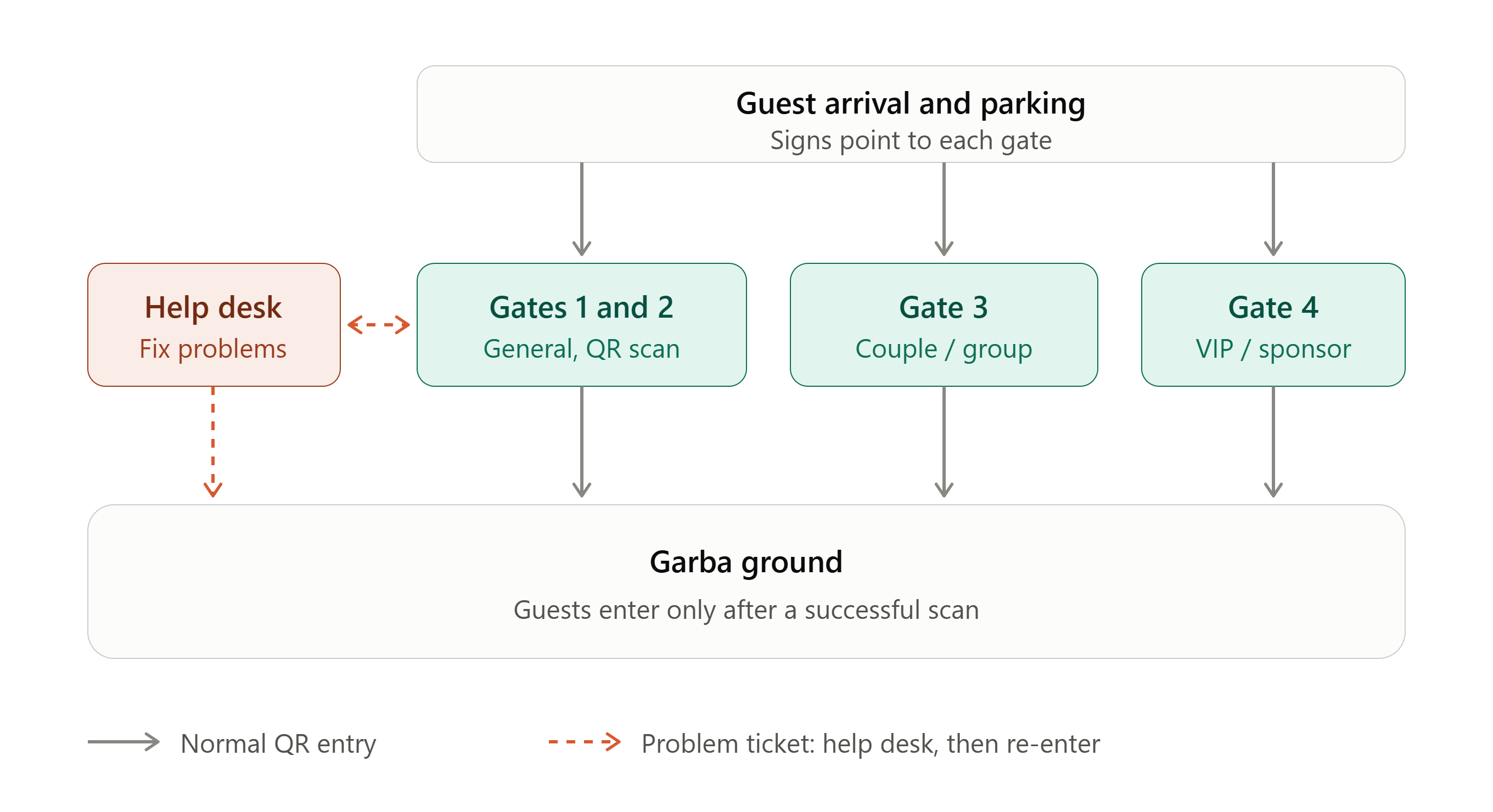
Problem Ticket → Move to Help Desk → Resolve → Return to Entry
This prevents one ticket problem from stopping an entire queue.
Keep a Separate Ticket Help Desk
One of the simplest ways to improve gate flow is to avoid solving every problem at the scanner.
A guest may say:
- “I did not receive my ticket.”
- “My QR code is not scanning.”
- “I bought the wrong ticket.”
- “My ticket is showing already used.”
- “Which gate should I use?”
- “I have a screenshot but cannot open the original ticket.”
If the scanning staff stop to investigate every issue, the main queue slows down.
Instead:
Scanner Team = Fast Verification
Help Desk = Ticket Problem Resolution
This division helps keep the main entry line moving.
How Many Staff Members Should You Keep at Each Gate?
There is no single number that works for every event.
Staff requirements depend on:
- Expected attendance
- Peak arrival period
- Number of gates
- Number of scanners
- Ticket categories
- Venue layout
- Expected support requirements
A gate team can have clearly divided responsibilities:
| Role | Responsibility |
| Queue Manager | Directs guests to the correct lane |
| QR Scanner | Scans digital tickets |
| Ticket Verifier | Handles ticket/access questions |
| Gate Coordinator | Controls movement into venue |
| Support Staff | Handles exceptions |
| Supervisor | Monitors the complete gate |
For smaller events, one person can handle more than one responsibility.
For larger events, separate roles are better.
What Should Happen If a QR Ticket Does Not Scan?
Do not immediately send the guest away.
First identify the problem.
Possible reasons:
- QR code is unclear.
- Guest is showing the wrong ticket.
- Ticket belongs to another event/date.
- Ticket has already been checked in.
- Device or scanner has an issue.
- Network connectivity is unstable.
- Guest cannot access the original digital ticket.
The guest should be moved to the ticket help desk while the main scanning queue continues.
This is one reason event organizers should test different ticket types and scanning devices before event day. Wowsly's current Garba checklist specifically recommends testing QR codes, scanners and the backup process before the event.
What If the Internet Is Weak at the Garba Venue?
Connectivity can become an operational concern at crowded event venues.
If the entry system depends completely on a live internet connection, a connectivity problem can slow down ticket verification.
Therefore, organizers should understand:
- What happens if the connection becomes slow?
- Is offline check-in available?
- Are backup devices ready?
- Does the gate team know the backup procedure?
- Who handles technical issues?
Wowsly has documented offline QR check-in for Navratri projects and specifically publishes guidance around QR entry when network connectivity is weak at Garba grounds.
The important point is not simply having a backup. The team should test the backup before guests arrive.
Use Clear Signage Before Guests Reach the Gate
Many entry problems begin before the QR scanner.
A guest may stand in the wrong queue simply because the signage is unclear.
Use large, easy-to-read signs such as:
GENERAL ENTRY
VIP ENTRY
COUPLE / GROUP ENTRY
TICKET HELP
ON-SPOT REGISTRATION
EXIT
If the venue has a large parking area, start directing guests before they reach the main entrance.
The objective is simple:
Guests should know where they need to go before they reach the queue.
Create a Peak-Hour Entry Plan
The busiest period may not be the same for every event.
Instead of planning only for the total number of tickets sold, organizers should identify when most guests are expected to arrive.
For example:
Before peak:Keep all gates prepared and staff in position.
During peak:Open additional lanes where possible and move support staff to busy areas.
After peak:Reduce unnecessary scanning capacity and keep enough staff for late arrivals.
A useful event-day rule is:
Move staff according to queue length, not according to where they were originally assigned.
If Gate 1 has a long queue while Gate 3 is almost empty, the supervisor should be able to redirect guests or staff where appropriate.
QR Tickets vs Manual Entry for Garba Events
| Factor | Manual Entry | QR-Based Entry |
| Ticket verification | Manual | Digital |
| Physical pass requirement | Often required | Not necessarily |
| Duplicate-entry control | More difficult | Can be system-supported |
| Attendance tracking | Manual work | Digital record |
| Multiple gates | More coordination | Easier to structure |
| Entry reporting | Manual | Digital data |
| Guest experience | Depends on staff | Faster when properly configured |
QR technology does not automatically solve every crowd problem.
The gate layout, staff, signage, ticket structure and operational process still matter.
The technology works best when the complete entry workflow is planned properly.
How Wowsly Can Help With Navratri Event Entry
Wowsly is an event technology platform designed to support organizers across different parts of the event journey.
For Navratri and Garba events, the workflow can include:
Event Creation
↓
Registration / Ticket Booking
↓
Payment
↓
Digital QR Ticket
↓
WhatsApp / Email Ticket Delivery
↓
QR Check-In
↓
Attendance Tracking
↓
Event Reports
Wowsly's published Navratri resources describe digital ticketing, QR passes, QR check-in, attendee management and reporting as part of its event technology offering.
For larger events, organizers can structure their entry process around multiple gates and different ticket categories while keeping attendee information connected to the digital ticketing workflow.
Wowsly has also documented Navratri projects involving QR passes, ticket delivery, on-spot registration and offline check-in.
A Simple Event-Day Entry Workflow for Organizers
Here is a practical setup an organizer can use:
Before Gates Open
- Check all QR scanning devices.
- Confirm every gate is ready.
- Brief gate staff.
- Check ticket categories.
- Confirm help-desk location.
- Put up entry signs.
- Test the backup entry process.
- Confirm the person responsible for gate decisions.
When Gates Open
- Direct guests to the correct queues.
- Scan QR tickets.
- Move ticket problems to the help desk.
- Monitor queue lengths.
- Keep VIP and special-access guests on their designated route.
During Peak Entry
- Watch for queue buildup.
- Move available staff where needed.
- Open additional lanes if the venue setup allows.
- Keep the help desk separate from normal scanning.
- Keep technical support available.
After Peak Entry
- Continue monitoring late arrivals.
- Review attendance information.
- Keep required gates open.
- Record major ticket or entry issues for future events.
Practical Example
Imagine a Garba event with four ticket categories:
- General
- Couple
- Group
- VIP
Instead of creating one large queue, the organizer can structure entry as:
Gate 1 + Gate 2 → General
Gate 3 → Couple / Group
Gate 4 → VIP
Help Desk → Ticket Issues
Guests receive digital QR tickets before arriving.
At the venue, signs direct them to the appropriate gate.
The scanning team handles normal QR verification.
If a ticket has a problem, the guest moves to the help desk instead of blocking the main queue.
This is a much cleaner operational model than having every guest and every ticket issue handled by the same person at one gate.
Final Navratri Entry Checklist
Before opening the gates, confirm:
☐ All QR tickets have been tested☐ Scanning devices are working☐ Backup devices are ready☐ Gate numbers are clearly displayed☐ Ticket categories are mapped to gates☐ Staff know their responsibilities☐ Help desk is ready☐ VIP / special guest process is clear☐ Backup connectivity process is tested☐ Guest communication has been sent☐ Emergency contacts are available☐ Queue managers are positioned☐ One event-day supervisor is responsible for gate decisions
The objective is simple:
Keep normal guests moving and move problems away from the main queue.
FAQs
How do you manage entry at a large Garba event?
Use multiple entry gates, separate ticket categories where practical, QR-based ticket verification, trained gate staff, clear signage and a separate help desk for ticket problems.
How can QR tickets reduce Garba event entry queues?
QR tickets allow staff to digitally verify a guest's ticket at the gate instead of relying entirely on manual guest-list checking. The actual queue speed still depends on the number of scanners, staff, gate layout and guest flow.
Should Garba events have multiple entry gates?
For larger events, multiple gates can help distribute arriving guests. Gates can be organized by ticket category, access level or expected crowd volume.
What should organizers do if a guest's QR ticket does not scan?
Move the guest to a separate ticket-support area and check the ticket, event/date, entry status and QR code. Avoid keeping the main scanning queue waiting while the issue is investigated.
How can organizers manage VIP and general Garba entry?
Use clearly marked entry routes for VIP and general guests. If the event has different access levels, make the ticket category clear to both the guest and gate staff.
What happens if the network stops working during Garba entry?
The organizer should have a tested backup process. If the chosen event technology supports offline check-in, the gate team should be trained to use it before event day.
How should staff be divided at a Garba entry gate?
Depending on event size, responsibilities can include queue management, QR scanning, ticket verification, guest support and gate supervision. Larger events benefit from separating these roles.
What information should be sent to guests before a Garba event?
Send the venue location, event timing, entry gate information, ticket instructions, parking details, important rules and any special entry instructions before guests arrive.
Can Wowsly manage QR check-in for Navratri events?
Yes. Wowsly is an event technology platform that supports digital tickets, QR-based event entry, attendee management and event workflows for Navratri, Garba and other event formats.
Can Wowsly support multiple entry gates?
Wowsly's QR-based event check-in workflow can be used as part of a multi-gate entry setup. The exact gate and staffing structure should be planned according to the venue, expected crowd and event requirements.
A Real-World Example: Raas Ratri Garba, Ahmedabad
Raas Ratri Garba 2025 in Ahmedabad needed a system that could handle registrations, payments, QR passes and guest check-ins across multiple event days. Wowsly supported the event with an event microsite, QR-code pass generation for up to 50,000 sponsors and guests, and on-spot registration where guests received their QR tickets directly on WhatsApp and Email.
For event-day entry, the team used offline check-in for faster scanning. A dedicated tech supervisor trained and monitored the manpower for 10 days, supported by a 10-person team handling scanning, check-in and box-office operations.
The organizer shared that the registration, QR ticketing and check-in process was smooth and well organized, and that the offline check-in system and dedicated event support made execution much easier.
Read the full Raas Ratri Garba case study →
For a large Navratri or Garba event, entry management starts before the first QR code is scanned.
Organizers need to decide:
Who enters where?
Which ticket goes to which gate?
Who handles QR scanning?
Who handles ticket problems?
What happens when queues increase?
What happens if connectivity becomes weak?
A well-planned entry process combines clear gates, QR tickets, trained staff, proper signage, guest support and a tested backup plan.
Wowsly can support the digital side of this journey through event registration, ticketing, digital QR tickets, QR-based check-in and attendee management.
The goal is not simply to scan tickets faster.
The goal is to make the journey from arrival → verification → entry clear and organized for both guests and event teams.
Planning a Navratri or Garba event?Use Wowsly to manage event registration, digital ticketing, QR passes and event check-in from one event technology platform.
Start your event with Wowsly.